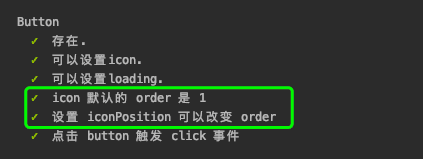
在vue2造UI轮子的项目中,因为parcel编译样式时速度有点慢,因此将其迁移到了vue-cli3,同时使用Vue-Test-Utils结合Karma对单元测试框架进行了升级。
Vue-Test-Utils
Vue Test Utils 是 Vue.js 官方的单元测试实用工具库。
官方文档
首先尝试用Mocha+webpack编写单元测试,依然是使用Chai断言库。
1
2
3
4
5
6
7
8
9
10
11
12
13
14
15
16
17
18
|
import chai, {expect} from 'chai'
import {shallowMount, mount} from '@vue/test-utils'
import Button from '@/components/button'
describe('Button', () => {
it('可以设置icon.', () => {
const wrapper = mount(Button, {
propsData: {
icon: 'settings'
}
})
const useElement = wrapper.find('use')
expect(useElement.attributes()['href']).to.equal('#x-settings')
wrapper.destroy()
})
}
|
mount V.S. shallowMount
mount()
参数:
{Component} component{Object} options
返回值: {Wrapper}
选项:移步选项,常用的有propsData,slots,attachTo
用法:创建一个包含被挂载和渲染的 Vue 组件的 Wrapper。
shallowMount()
用法和 mount 一样,创建一个包含被挂载和渲染的 Vue 组件的 Wrapper,不同的是被存根的子组件。
mount()和shallowMount()的区别
- 参考这篇笔记
mount()会将测试组件中使用到的子子孙孙组件完全渲染,而shallowMount()不会- 为保证测试速度,能用
shallowMount()的地方都尽量用mount()
为什么要使用Karma
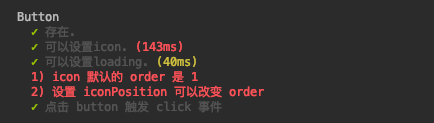
将原来button.spec.js 测试用例复制过来后,发现涉及到了样式的测试都未通过
1
2
3
4
5
6
7
8
9
10
11
12
|
it('icon 默认的 order 是 1', () => {
const wrapper = mount(Button, {
propsData: {
icon: 'setting'
}
})
const vm = wrapper.vm
const icon = vm.$el.querySelector('svg')
expect(getComputedStyle(icon).order).to.eq('1')
})
|
原因是这个测试框架是运行在node.js里,而非运行在浏览器,所以没有DOM,无法得到元素的样式。
官方文档中提到attachTo:htmlELement可以将元素设置到DOM中,然而添加后测试依然不通过。
因此,为了解决这个问题,需要使用Krama启动浏览器运行测试。
配置方法
安装依赖
1
| npm i -D karma karma-chrome-launcher karma-mocha karma-sourcemap-loader karma-spec-reporter karma-webpack chai sinon sinon-chai
|
创建karma.conf.js
1
2
3
4
5
6
7
8
9
10
11
12
13
14
15
16
17
18
19
20
21
22
|
var webpackConfig = require('./webpack.config.js')
module.exports = function(config) {
config.set({
frameworks: ['mocha'],
files: ['test/**/*.spec.js'],
preprocessors: {
'**/*.spec.js': ['webpack', 'sourcemap']
},
webpack: webpackConfig,
reporters: ['spec'],
autoWatch: true,
browsers: ['ChromeHeadless']
})
}
|
配置package.json
在 package.json 定义测试脚本
1
2
3
4
| "scripts": {
"test": "karma start --single-run",
"test:unit": "karma start"
}
|
编写测试用例
添加karma后,将样式相关的测试用例重新编写,举个栗子:
1
2
3
4
5
6
7
8
9
10
11
12
13
14
15
| it('icon 默认的 order 是 1', () => {
const div = document.createElement('div')
document.body.appendChild(div)
const wrapper = mount(Button, {
attachTo: div,
propsData: {
icon: 'settings',
}
})
const vm = wrapper.vm
const icon = vm.$el.querySelector('svg')
expect(getComputedStyle(icon).order).to.eq('1')
div.remove()
wrapper.destroy()
})
|