
vuex介绍
- vuex是什么:Vuex 是一个专为 Vue.js 应用程序开发的状态管理模式。它采用集中式存储管理应用的所有组件的状态,并以相应的规则保证状态以一种可预测的方式发生变化。Vuex 也集成到 Vue 的官方调试工具 devtools extension,提供了诸如零配置的 time-travel 调试、状态快照导入导出等高级调试功能。
- vuex文档地址:https://vuex.vuejs.org/zh/
vuex使用
安装vuex
1
npm i vuex --save
创建仓库文件
src/store/index.js1
2
3
4
5
6
7
8
9
10
11
12
13
14
15
16import Vue from "vue";
import Vuex from "vuex";
// 安装插件
Vue.use(Vuex);
// 实例化一个仓库对象
let store = new Vuex.Store({
state:{},
getters:{},
mutations:{},
actions:{},
modules:{}
})
// 暴露
export default store;在main.js中引入
1
2
3
4
5
6
7
8
9
10
11
12
13
14
15
16
17
18import Vue from 'vue'
import App from './App'
import router from './router'
// 引入Store
import store from "./store"
Vue.config.productionTip = false
/* eslint-disable no-new */
new Vue({
el: '#app',
router,
store, // 挂载到vue实例上面去
components: { App },
template: '<App/>'
})一旦将vuex仓库实例挂载到vue实例上面,所有的组件的this里面都会出现一个$store,表示这个仓库实例对象
核心概念
state
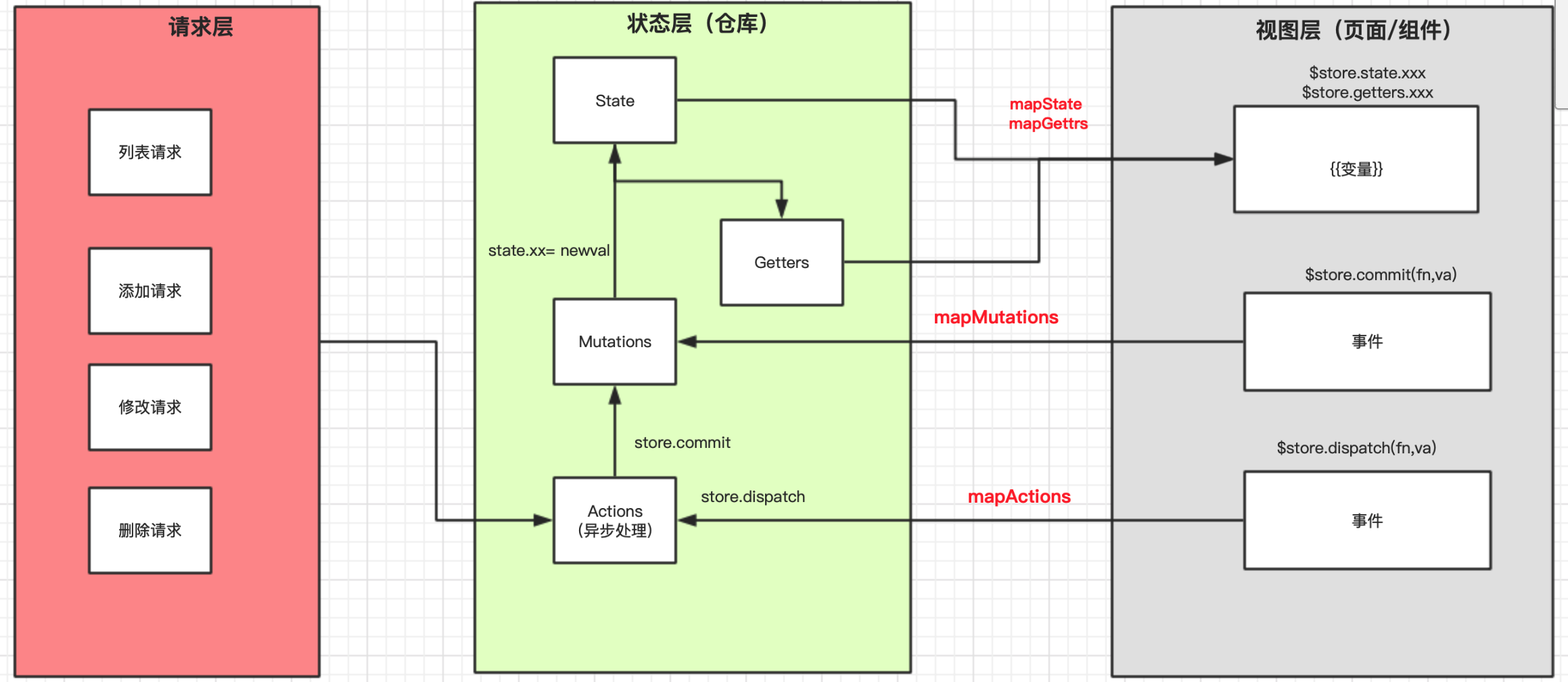
作用: 类似于所有组件的data,所有组件都可以在这里读取数据,实现共享
使用:
1
2
3
4
5
6let store = new Vuex.Store({
state:{
key:val,
key2:val2
}
})组件模板中
1
{{ $store.state.key }}
利用辅助函数
mapState1
2
3
4
5
6
7
8
9
10
11
12// 组件中
import { mapState } from "vuex"
export default {
...,
computed:{
...mapState(['key','key2'])
}
}
// 组件模板中
{{key}}
{{key2}}
getters
作用:对仓库里面state数据进行一些加工处理。功能类似组件的computed。
实现:
1
2
3
4
5
6
7
8
9
10
11let store = new Vuex.Store({
state:{
key:val,
key2:val2
},
getters:{
newkey(state){
return state.key+'xxx处理'
}
}
})组件模板中
1
{{$store.getters.newkey}}
利用辅助函数
mapGetters1
2
3
4
5
6
7
8
9
10
11// 组件中
import { mapGetters } from "vuex"
export default {
...,
computed:{
...mapGetters(['newkey'])
}
}
// 组件模板中
{{newkey}}
mutations
作用: vuex中唯一一个可以修改state里面数据的方法。切记不可以通过在组件中赋值state进行修改
1
this.$store.state.key = newval // 错误的写法
使用:
1
2
3
4
5
6
7
8
9
10
11
12let store = new Vuex.Store({
state:{
key:val,
key2:val2
},
mutations:{
// 形参1是state数据 形参2是调用该方法传入的实参
FN(state,data){
state.key = data
}
}
})组件中实现
1
$store.commit('FN',实参)
利用辅助函数
mapMutations1
2
3
4
5
6
7
8
9
10
11// 组件中
import { mapMutations } from "vuex"
export default {
...,
methods:{
...mapMutations(['FN'])
}
}
// 组件模板中
@click="FN(实参)"
actions
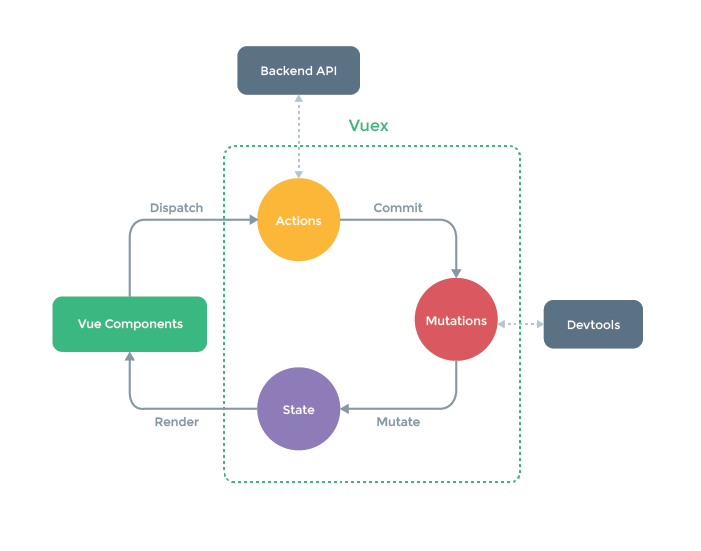
作用: 用来修改state。 但是确实间接修改, 他是通过触发mutations里面的方法去修改state 。 actions里面通常存放大量的异步逻辑请求代码。成功之后将数据给muations,然后mutations设置给state。
使用:
1
2
3
4
5
6
7
8
9
10
11
12
13
14
15
16
17
18let store = new Vuex.Store({
state:{
key:val,
key2:val2
},
mutations:{
// 形参1是state数据 形参2是调用该方法传入的实参
FN(state,data){
state.key = data
}
},
actions:{
// 形参1是store,就是这个仓库实例对象。 形参2是调用该方法传入的实参
fn(store,info){
store.commit('FN',info)
}
}
})组件中实现
1
$store.dispatch('fn',实参)
利用辅助函数
mapActions1
2
3
4
5
6
7
8
9
10
11// 组件中
import { mapActions } from "vuex"
export default {
...,
methods:{
...mapActions(['fn'])
}
}
// 组件模板中
@click="fn(实参)"注意:actions和mutations的区别
- mutations 是唯一修改state的方法,且是同步修改
- actions是间接修改state(通过触发mutations), actions里面存放异步处理逻辑
思路图
modules
- 针对于大型项目放在一个根模块,状态的维护困难。
- 对于不同项目不同模块的状态管理我们往往存放不同模块中,这样易于维护便于管理。
写法
结构
1
2
3
4
5
6
7
8
9
10
11
12
13
14
15
16
17
18
19
20
21
22
23
24
25// store/index.js文件
let store = new Vuex.Store({
state:{ 根state },
getters:{ 根getters },
mutations:{ 根mutations },
actions:{ 根actions },
modules:{
模块名1:{
namespaced:false/true, // 不写就是false
state:()=>({ 模块state }), // 注意模块的state是一个函数,且这个函数返回一个对象
getters:{ 模块getters },
mutations:{ 模块mutations },
actions:{ 模块actions },
modules:{ 子模块 }
},
模块名2:{
namespaced:false/true, // 不写就是false
state:()=>({ 模块state }),
getters:{ 模块getters },
mutations:{ 模块mutations },
actions:{ 模块actions },
modules:{ 子模块 }
}
}
})真实结构:
store目录
index.js 仓库对象 【文件】
1
2
3
4
5
6
7
8
9
10
11
12
13
14
15
16
17
18
19
20// 导入根配置
import state from "./state"
import getters from "./getters"
import mutations from "./mutations"
import actions from "./actions"
// 导入模块
import 模块1 from "./模块名1"
import 模块2 from "./模块名2"
let store = new Vuex.Store({
state:state,
getters:getters,
mutations:mutations,
actions:actions,
modules:{
模块名1:模块1,
模块名2:模块2
}
})state.js 【文件】
1
2
3
4// 根state
export default {
key:val
}getters.js 【文件】
1
2
3
4
5
6
7
8
9
10
11
12// 根getters
export default {
newkey(state){ // state 根state state.模块名1 模块1的所有state state.模块名2 模块2的所有state
return state.key
}
newkey(state){
return state.模块名1.key
}
newkey2(state){
return state.模块名2.key
}
}mutations.js 【文件】
1
2
3
4
5
6
7
8// 根mutations
export default {
// 自己的state, 和调用该方法传入的实参
FN(state,data){
state.key = data;
},
...
}actions.js 【文件】
1
2
3
4
5
6
7
8// 根actions
export default {
// store就是仓库实例对象 , 和调用该方法传入的实参
fn(store,info){
store.commit('FN',info)
},
...
}modules 【文件夹】
模块名1.js
1
2
3
4
5
6
7export default {
state:()=>({ 模块state }),
getters:{ 模块getters },
mutations:{ 模块mutations },
actions:{ 模块actions },
modules:{ 子模块 }
}模块名2.js
获取数据
获取state
1
2
3
4
5
6
7
8
9
10
11
12{{$store.state.key}} // 去根state里面的数据
{{$store.state.模块名.key}} // 去某个模块state里面的数据
// state结构
state:{
key:val,
key2:val2,
模块名:{
key:val,
key2:val2
}
}获取getters
1
2
3
4{{$store.getters.key}} // 去根getters里面的数据
{{$store.getters.key2}} // 去某个模块里面getter的数据
// 所有的getters 都会被挂载到根getters上面
namespaced:false
命名空间没有。没有命名空间的时候,所有的actions最后都是在根actions上面了。所有的mutations都到根mutations上面了。
组件中
1
2
3
4...mapState({
key:'key', // 根的,取根state里面的key
key2:state=>state.模块名.key2 // 取模块的, 去模块state里面的key2
})1
...mapGetters(['key1','key2']) // key1是根getters里面,key2是模块getters里面key2
1
2
3$store.commit('任意模块的mutations里面的方法',实参)
...mapMutations(['FN1','FN2']) // FN1是根mutations里面的方法, FN2是模块里面的mutations里面的方法1
2
3$store.dispatch('任意模块的actions里面的方法',实参)
...mapActions(['fn1','fn2']) // fn1是根actions里面的方法, fn2是模块里面的actions里面的方法模块中(actions里面方法里)调用其他模块的mutations或actions里面的方法
1
2
3
4
5
6
7
8
9
10
11
12
13
14
15
16
17
18
19
20
21// A模块
{
...,
mutations:{
FN(state,data){
state.key = data
}
},
actions:{
fn(store,info){
store.commit('FN',info) // 触发自己的mutations里面的方法
store.dispatch('fn2') // 触发自己的actions里面的其他方法
// A模块触发B模块里面的方法 缺点: 无法区分调用的方法是哪个模块的 对于大型项目而言,非常的混乱
store.commit('FN3',info)
store.dispatch('fn3',info)
}
fn2(store,info){...}
}
}1
2
3
4
5
6
7
8
9
10
11
12
13
14
15
16//B模块
{
...,
mutations:{
FN3(state,data){
state.key = data
}
},
actions:{
fn3(store,info){
store.commit('FN3',info) // 触发自己的mutations里面的方法FN3
store.dispatch('fn4') // 触发自己的actions里面的其他方法fn4
}
fn4(store,info){...}
}
}
namespaced:true
命名空间有
组件中
1
2
3
4...mapState({
key:'key', // 根的,取根state里面的key
key2:state=>state.模块名.key2 // 取模块的, 去模块state里面的key2
})1
2
3
4...mapGetters({
key1:'key1' // key1是根getters里面
key2:'模块名/key2' // key2是模块getters里面key2
})1
2
3
4
5
6$store.commit('模块名/该模块mutations里面的方法',实参)
...mapMutations({
FN1:'FN1', // FN1是根mutations里面的方法
FN2:'模块名/FN2' // FN2是模块里面的mutations里面的方法
})1
2
3
4
5
6$store.dispatch('模块名/该模块actions里面的方法',实参)
...mapActions({
fn1:'fn1', // fn1是根actions里面的方法
fn2:'模块名/fn2' // fn2是模块里面的actions里面的方法
})模块中(actions里面方法里)调用其他模块的mutations或actions里面的方法
1
2
3
4
5
6
7
8
9
10
11
12
13
14
15
16
17
18
19
20
21
22
23
24
25
26
27
28
29// A模块
{
...,
mutations:{
FN(state,data){
state.key = data
}
},
actions:{
fn(store,info){
store.commit('FN',info) // 触发自己的mutations里面的方法
store.dispatch('fn2') // 触发自己的actions里面的其他方法
// A模块触发B模块里面的方法
store.commit('模块名/FN3',info,{root:true})
store.dispatch('模块名/fn3',info,{root:true})
// store相关信息
// store.state 当前模块的state
// store.getters 当前模块的getters
// store.commit 调用任意模块的muations,注意模块名,root:true
// store.dispatch 调用任意模块的actions,注意模块名,root:true
// store.rootState 根state
// store.rootGetters 根getters
}
fn2(store,info){...}
}
}1
2
3
4
5
6
7
8
9
10
11
12
13
14
15
16//B模块
{
...,
mutations:{
FN3(state,data){
state.key = data
}
},
actions:{
fn3(store,info){
store.commit('FN3',info) // 触发自己的mutations里面的方法FN3
store.dispatch('fn4') // 触发自己的actions里面的其他方法fn4
}
fn4(store,info){...}
}
}